Tuesday, January 31, 2012


Startup Cleaner 2.0 - Some apps load on startup when you install them causing your phone to use memory and slow down. By removing these apps you will free up resources your phone needs. Startup Cleaner 2.0 by Bright Wallace helps you to select which apps you want to startup. When you launch the app it shows the programs that are loaded and allows you to check the ones you want to remove. 

I will say the interface is a little confusing. It shows all of the apps with "Prevent Startup Applied" in green or white.  White means it will need to be applied and green means it has been applied.  You can long press an app to get extra options. You can manage the app further or uninstall the program.  When your phone boots it will show you how many apps were stopped.  I was surprised how many it prevented (23) when I first used it.  I won't say that I have noticed a big difference on the Galaxy Nexus but my old Vibrant does seem to run better.  The memory on some of the ICS roms has been a problem so having more available is a big help.

The app is free on the market and a good utility to have.  I hope they simplify the interface and make it a on/off type switch.

Thursday, January 26, 2012


MobiLearn Talking - My wife and I hope to go to Europe one day. Since we only speak English I am worried that we wouldn't be able to communicate for basic needs while traveling.  I downloaded MobiLearn Training Phrasebook to see if it would be helpful while traveling.  The concept of the app is to translate common phrases from English to Spanish, French, German or Italian.  The phrases are broken into categories such as conversational, transportation, lodging, numbers & times and emergencies.

Once you pick your category there are several to select from starting with hello and much more specific phrases.  You click the phrase and select your language from buttons below and it shows you the phrase.  Click the phrase and the app speaks the phrase for you.  It is simple to use. I feel that I could go to Italy and be able to survive if I get off the beaten path.  It does not translate Scottish to English so in Scotland I might still be lost! I think that for basic phrases and a trip where you would only need some common phrases MobiLearn Talking is more than enough.

The trial version is free and the full version runs $9.99. It was a free app of the day on Amazon a few weeks ago and I picked it up then knowing I hope to one day use it.  Try the free version to see if you think it would be helpful. I don't think it will allow you to travel and not know any of the language but it is a good way to get a refresher while you are traveling.

https://market.android.com/details?id=mobilearn.android.phrasebook&feature=search_result#?t=W251bGwsMSwxLDEsIm1vYmlsZWFybi5hbmRyb2lkLnBocmFzZWJvb2siXQ..

Wednesday, January 25, 2012

Dashboard Assist - In honor of finally getting my car back from the repair shop I wanted to review an app that is used in the car. There are so many of these but I had one I wanted to try that uses your GPS to show your speed and direction. Dashboard Assist by RobotiCode Ltd has a ton of features compared to other travel apps.  You can have it mounted up in your windows with the camera thru-view enabled so that you can see what is behind the phone. It tells you what level your fuel economy is at based on your speed. It charts your trip letting you see your speeds. It can log those events and email them to you. The app can show you G-forces, maximum and average speeds.  There are different dials and color schemes to customize the app.

Just when I thought I had found everything the app can do I realized that it can also speak the speeds. The pro version which is $3.99 adds live speed graphs, journey vlogs, call auto answer, spoken incoming messages, music controls and removes the ads. I downloaded this app to help save gas but I find it does so much more.  I downloaded the pro version when it was the free Amazon app of the day. I have not had much of a chance to use it until now.  It is a great way to keep your eyes on the road but be able to go back and review your trip. It also is a great app for people that drive and need to keep track of the traveling they do. It will automatically email you the details so that at the end of the month you could just go through the emails to see when and where you drove for your expense report.

https://market.android.com/details?id=uk.co.roboticode.dashboardassist&feature=search_result#?t=W251bGwsMSwyLDEsInVrLmNvLnJvYm90aWNvZGUuZGFzaGJvYXJkYXNzaXN0Il0.

Tuesday, January 24, 2012

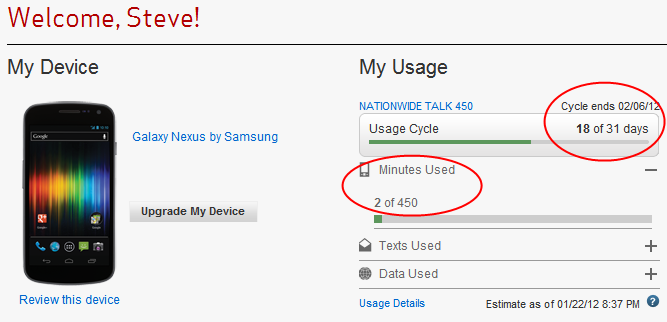
As you can see after 18 days on this billing cycle I have used only 2 minutes of my plan.  Those were used before I had GrooveIP setup and working completely.  I could theoretically use no minutes next month. 

I was concerned going to this plan with 50 less minutes per month than I had before.  I have probably used over 250 minutes so far this month. That is normally what I would use in a typical month but my oldest son has gone back on campus this semester and my on my mother's birthday I called and spoke to her for almost 45 minutes one day.  I don't expect to use that many minutes normally but it is great having the freedom to know I could talk as much as I would like.

Since I am on wifi most of the time I have only used about 580MB of total data this month so far across the cell network.115MB is from GrooveIP phone calls since Jan 6th. I also thought that using my 4GB data plan was going to be a problem since I was routing all of my voice traffic over the data connection.  However, I feel that my data usage is low for the amount of time I have used it. I have used 147MB on wifi for voice calls so it has been almost an even split.

For 250+ minutes of voice and only around 260MB of total data I think GrooveIP is really paying off. I know I have posted a few times about this app but I wanted to let everyone see how this app works in real world situations.


I have put the extended battery (2100mAh) and the OtterBox Commuter case on the Nexus. It has added some weight but after I dropped the phone this morning from about 2 feet I decided it was worth the little extra bulk! I haven't dropped a phone in about 2 years. Good thing it happened after I put the case on.

Monday, January 23, 2012

Well I have joined the staff of Android Activist as a part time writer. I am very excited to join their team and look forward to being able to better serve the Android community.  I will still post app reviews here and I hope to be able to still be a guest on the Android Vibe podcast.

Steve

http://androidactivist.org/staff/steve-birchfield/

FriendCaster - I hate Facebook. From the interface to the mobile app I cannot stand to be on it. If it wasn't for my wife and kids living on it I would probably just delete my account. However, since my family, friends from school, church and co-workers from jobs past are all on there and not looking to make the move to Google+ anytime soon I have a need to check it.  The mobile app is terrible these days and just slow. It tries to get my GPS location every time I open the app then it has to load the data. I like G+ and Twitter because they load fast. I had all but given up on the mobile app until I found FriendCaster. FriendCaster is a Facebook alternative client for Android. It loads quickly and comes up with several buttons.  There is a news feed button to see what your family and friends are up to. You have a profile button that is a fast way to see your profile information. There are other tabs in that screen relating to your profile. You can find your friends, photos messages notifications and groups.  You can check in through the app.

Though the app is fast and a great way to just get in and out of Facebook, I am annoyed with the ads. They are located at the bottom and a few of them look like notifications.  I have clicked the ad a few times thinking it was my notification. The pro version is $4.99.  If I really used Facebook I would likely just use the mobile web version instead of paying $5 for this app. But the few times a day I check Facebook the lite version works just fine.